

Base URL
The base URL for all API requests is:Base URL
How to Use the API
To use the Evergreen Ai API, you need to authenticate your requests using an API key. You can obtain an API key from your Evergreen Ai account dashboard.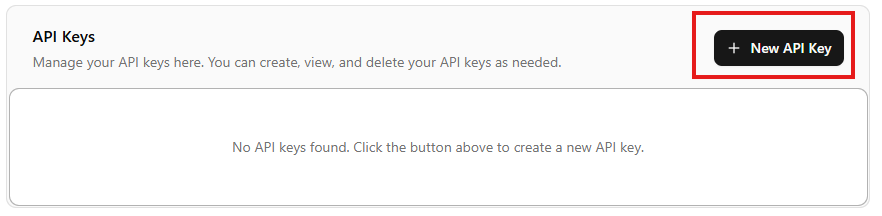
Log in to your Evergreen account
Login to your Evergreen Ai account and navigate to the API Keys section in your dashboard.
Create API Key
- Visit the API Keys section and click on
+ New API Key - Name your API key and set the desired permissions.
- Click Create to generate your API key.
- Copy the generated API key and store it securely. You will need it to authenticate your API requests.
Rate Limits
To protect the stability of the API and keep it available to all users, Evergreen enforces multiple kinds of rate limiting. Requests that hit any of our rate limits will receive a429 Too Many Requests response, which contains the standard Retry-After header indicating how many seconds the client should wait before retrying the request.
Limits are allocated per authorization token. Different tokens will have independent limits.
Standard rate limits
Our standard rate limiter imposes a quota on how many requests can be made in a given window of time. Our limits are based on minute-long windows. We may change these quotas or add new quotas (such as maximum requests per minutes) in the future.| Rate Limit Type | Maximum requests per minute |
|---|---|
Ai Resources (Applied to all Tedi resources) | 60 |
Dashboard Resources (Account, Logs Observations) | 300 |
| All other resources | 450 |
If you anticipate a higher read volume, we recommend using a caching proxy.
Concurrent request limits
In addition to limiting the total number of requests in a given time window, we also limit the number of requests being handled at any given instant. We may change these limits or add new limits in the future.| HTTP Method | Maximum concurrent requests |
|---|---|
GET | No limit |
POST | 5 |
PUT & DELETE | 20 |
POST requests, 1 will be processed immediately, and the other 9 will receive a 429 Too Many Requests response.
Responses for requests rejected by this concurrent request limiter will contain a Retry-After header, which specifies a duration long enough (in seconds) such that the other in-flight requests are guaranteed to have either completed or timed out.
Request timeout
To ensure optimal performance and resource management, the Evergreen Ai API enforces server-side timeouts on requests. The maximum allowed processing time for a request is30 minutes. If a request exceeds this duration, the server will terminate the connection and return a 504 Gateway Timeout response or 408 Request Timeout response.