
Documentation Index
Fetch the complete documentation index at: https://docs.evergreens.ai/llms.txt
Use this file to discover all available pages before exploring further.

- Comparing AI responses - See how different AI assistants answer the same question
- Finding the best answer - Some AI providers might give better results for certain topics
- Tracking sources and citations - See where each AI gets its information from
- Understanding AI differences - Learn which AI models work best for your needs
How It Works
1. Enter Your Prompt
Type your question or prompt in the search box. You can enter up to 2,000 characters to create detailed queries.2. Select Your Location and Language
Choose your preferred:- Country - This affects the region-specific results (e.g., Austria, Germany, United States)
- Language - Set the language for your query (e.g., German, English)
3. Choose AI Providers
Click the provider icons to select which AI assistants you want to query. Available providers include:| Provider | Description |
|---|---|
| ChatGPT | OpenAI’s conversational AI assistant |
| Perplexity | AI-powered search engine with citations |
| Gemini | Google’s AI assistant |
| Grok | xAI’s conversational AI |
| Copilot | Microsoft’s AI assistant |
| AI Mode | Google’s AI Mode in search |
| AI Overview | Google’s AI-generated search summaries |
4. Start Search
Click “Start Search” to send your prompt to all selected AI providers simultaneously.Understanding Results
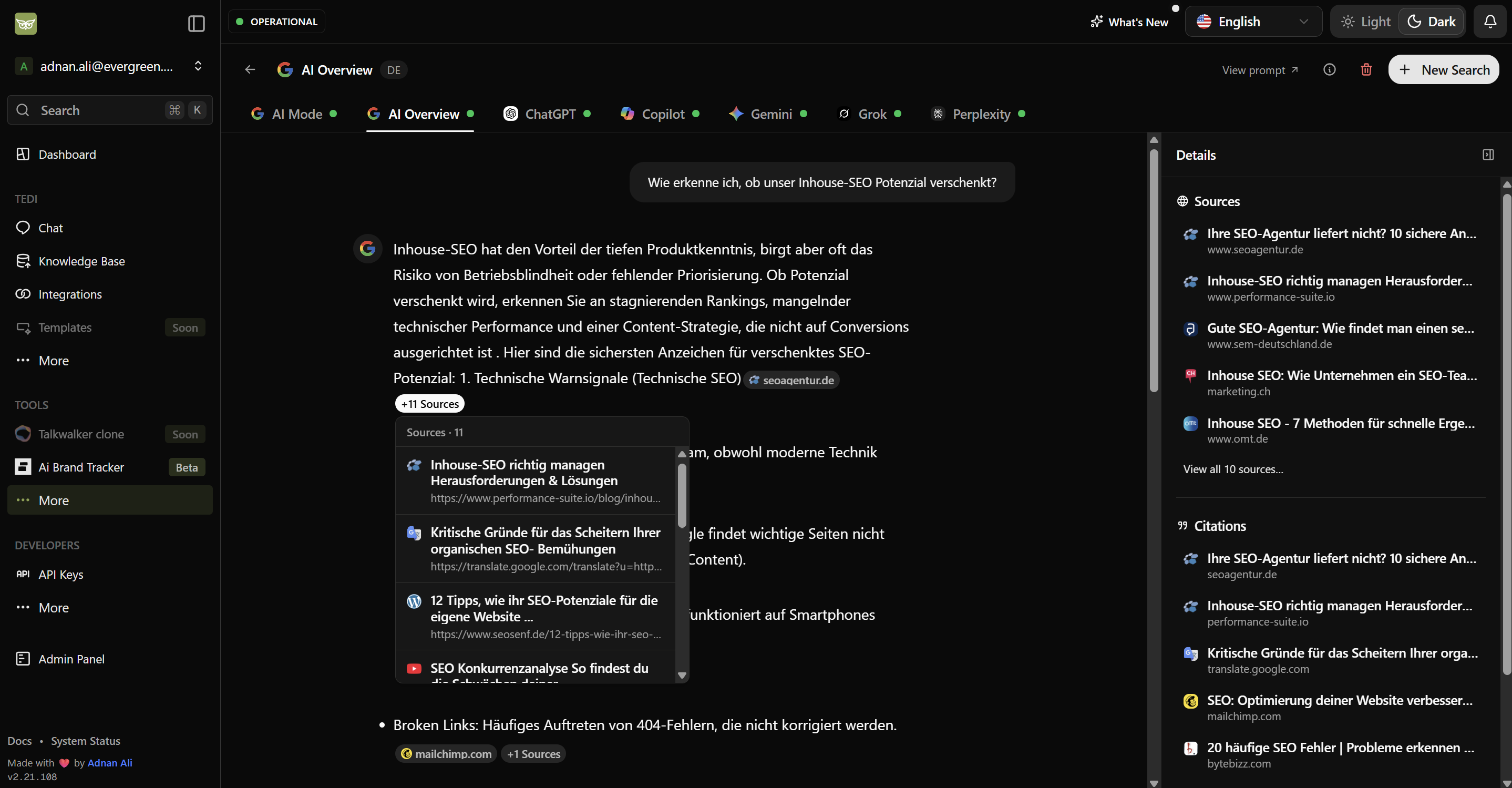
Once results are ready, you’ll see tabs for each AI provider at the top of the page. A colored indicator shows the status:- Green dot - Results loaded successfully
- Loading Spinner - Partial results or processing
Response Content
Each provider tab displays:- The AI’s complete response to your prompt
- Inline citations - Clickable references within the text showing where information came from
- Sources count - Click to expand and see all sources referenced
Details Sidebar
On the right side, you’ll find:Sources
Sources
A list of all websites and resources the AI referenced when generating its response. Each source includes the page title and URL.
Citations
Citations
Specific quotes or references extracted from the sources, showing exactly which information was used in the response.
Model
Model
The specific AI model version that generated the response (e.g., GPT-5, Gemini 3, etc.). This helps you understand which technology powered each answer.
Data Quality Notice
Tips for Best Results
Be Specific
Write detailed prompts to get more accurate and relevant responses from all providers.
Compare Citations
Check which sources different AIs reference - some may cite more authoritative sources than others.
Try Different Languages
Some AI providers perform better in certain languages. Experiment to find the best results.
Check the Model
The model information helps you understand performance differences between providers.
Frequently Asked Questions
Do you use APIs to get AI responses?
No, we don’t use APIs. Our AI Agent Tedi uses a real browser to visit each AI provider’s website, just like you would. Tedi types your question, waits for the response, and brings back the results. This means you’re seeing the exact same answers a real user would get when visiting these AI platforms directly.Why do language and country settings matter?
When you select a country and language, Tedi opens a browser from server that location and visits the AI provider’s website in your chosen language. This simulates what a real user from that country would experience. These settings can impact your results because:- Location-based answers - AI providers may give different recommendations, news, or local information based on where the user is located
- Language behavior - Some AI assistants perform better or provide more detailed answers in certain languages
- Regional sources - Citations and references may come from region-specific websites and publications
- Cultural context - Responses may be tailored to local customs, regulations, or preferences
Why simulate real user experience instead of using APIs?
APIs often provide different results than what regular users see on the website. Here’s the difference:| Feature | API Access | Real User Experience (Our Approach) |
|---|---|---|
| Web Search | Limited or unavailable | Full web search with live results |
| Sources & Citations | Often missing | Complete with clickable links |
| Image Generation | Separate API required | Included when available |
| Plugins & Tools | Not available | All provider tools accessible |
| Response Format | Raw text only | Rich formatting as displayed |
| Real-time Data | Often outdated | Current, live information |