

Tedi is now more powerful than any AI agent or chat system when it comes to accessing real-time public data.
Definition
Below are the key definitions related to theSearchEntity:
SearchEntity
| Property | Description |
|---|---|
| query | The search query string used to perform the search. |
| maxResults | The maximum number of search results to return. |
| countryCode | The ISO 3166-1 alpha-2 country code to tailor search results to a specific country. |
| languageCode | The ISO 639-1 language code to specify the language of the search results. |
| fields | An array specifying which fields to include in the search results. |
Web Search
TheWebSearchEntity extends the SearchEntity to provide specific fields for web search results.
Definition
WebSearchEntity
WebSearchEntity fields:
| Property | Description |
|---|---|
title | The title of the web page. |
url | The URL of the web page. |
description | A brief description of the web page. |
position | The position of the web page in the search results. |
Example
Below is an example of aWebSearchEntity request and response:
Image Search
TheImageSearchEntity extends the SearchEntity to provide specific fields for image search results.
Definition
ImageSearchEntityFields
ImageSearchEntity fields:
| Property | Description |
|---|---|
title | The title of the search. |
source_link | The URL of the page where the image is found. |
source_name | The name of the source website. |
image_link | The direct URL to the image. |
image_alt | The alt text of the image. |
position | The position of the image in the search results. |
Example
Below is an example of anImageSearchEntity request and response:
Video Search
TheVideoSearchEntity extends the SearchEntity to provide specific fields for video search results.
Definition
VideoSearchEntity
VideoSearchEntity fields:
| Property | Description |
|---|---|
title | The title of the video. |
description | A brief description of the video. |
link | The URL link to the video. |
image | The thumbnail image URL of the video. |
duration | The duration of the video in a human-readable format (e.g., “5:30”). |
duration_seconds | The duration of the video in total seconds (e.g., 330). |
position | The position of the video in the search results. |
Example
Below is an example of aVideoSearchEntity request and response:
Shopping Search
TheShoppingSearchEntity extends the SearchEntity to provide specific fields for shopping search results.
Definition
ShoppingSearchEntity
ShoppingSearchEntity fields:
| Property | Description |
|---|---|
title | The title of the product. |
link | The URL link to the product page. |
price | The current price of the product. |
oldPrice | The old price of the product (if available). |
shop | The name of the shop or seller. |
distance | The distance to the shop (if applicable). |
totalReviews | The total number of reviews for the product. |
position | The position of the product in the search results. |
Example
Below is an example of aShoppingSearchEntity request and response:
News Search
TheNewsSearchEntity extends the SearchEntity to provide specific fields for news search results.
Definition
NewsSearchEntity
NewsSearchEntity fields:
| Property | Description |
|---|---|
title | The title of the news article. |
description | A brief description of the news article. |
link | The URL link to the news article. |
date | The publication date of the news article. |
image | The thumbnail image URL of the news article. |
position | The position of the news article in the search results. |
Example
Below is an example of aNewsSearchEntity request and response:
People also search for
ThePeopleAlsoSearchForEntity extends the SearchEntity to provide specific fields for related search terms.
Definition
PeopleAlsoSearchForEntity
PeopleAlsoSearchForEntity fields:
| Property | Description |
|---|---|
text | The related search term text. |
link | The URL link to the related search results (Google link). |
position | The position of the related search term in the results. |
Example
Below is an example of aPeopleAlsoSearchForEntity request and response:
AI Mode
TheAiModeEntity provides fields for AI-powered search results.
Definition
AiModeEntity
AiModeEntity fields:
| Property | Default | Description |
|---|---|---|
query | - | The search query string. |
screenshots | true | Whether to include screenshots from Tedi Browser in the search results. |
countryCode | at | The ISO 3166-1 alpha-2 country code for the search location. |
languageCode | de | The ISO 639-1 language code for the search results. |
fields | - | Object to specify which response fields to include (citations, sources, paragraphs). |
Screenshot URLs are only available for 24 hours after generation. Make sure to download or cache them if you need to retain them longer.
Example
The following example shows anAiModeEntity request and response:
| Key | Description |
|---|---|
text | The main AI-generated response text displayed in the Google AI Mode interface. This is the synthesized answer based on multiple sources. |
citations | An array of inline citations embedded within the AI response text. |
paragraphs | An array of paragraphs that compose the AI response, each containing its own text and associated citations. |
sources | A list of source websites displayed in the right sidebar of the Google AI Mode interface, including title, description, source domain, and favicon. |
screenshots | URLs to debugging screenshots captured during the AI Mode process by Tedi Browser, showing the initial state, the state before submission, and the final rendered response. |
Response Explanation
The image below illustrates how the AI Mode response maps to the actual Google AI Mode interface: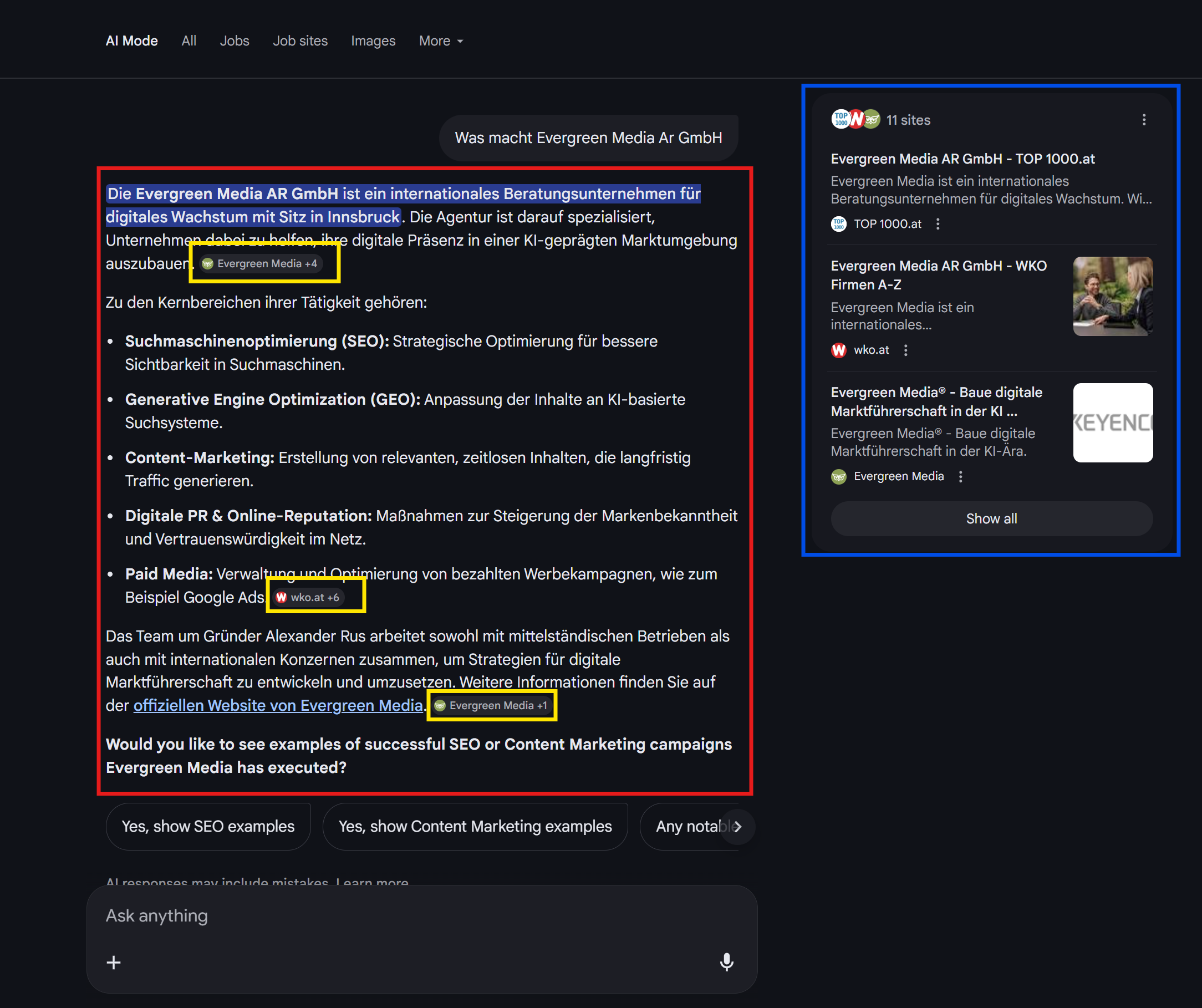
The yellow highlighted boxes in the image indicate the different response components returned by the API.
| UI Element | API Field | Description |
|---|---|---|
| 🔴 Main AI Response (red bordered area) | text | The AI-generated answer text that appears in the main content area. This contains the synthesized information from multiple sources. |
| 🟡 Inline Citations (yellow boxes within text) | citations | References embedded within the AI response (e.g., “Evergreen Media +4”, “wko.at +6”). Each citation links to a source URL with the specific text it references. |
| 🔵 Source Panel (right sidebar) | sources | The list of source websites shown on the right side, including title, description, source domain, and favicon icon. |
citations array provides granular source attribution for specific claims within the AI response, while sources offers a broader overview of all referenced websites with their metadata.
AI Overview
TheAiOverviewEntity provides fields for Google AI Overview results (the AI-generated summary shown at the top of Google search results).
Definition
AiOverviewEntity
AiOverviewEntity fields:
| Property | Default | Description |
|---|---|---|
query | - | The search query string. |
screenshots | true | Whether to include screenshots from Tedi Browser in the search results. |
countryCode | at | The ISO 3166-1 alpha-2 country code for the search location. |
languageCode | de | The ISO 639-1 language code for the search results. |
fields | - | Object to specify which response fields to include (citations, sources, paragraphs). |
Screenshot URLs are only available for 24 hours after generation. Make sure to download or cache them if you need to retain them longer.
Response Explanation
The image below illustrates how the AI Overview response maps to the actual Google AI Overview interface: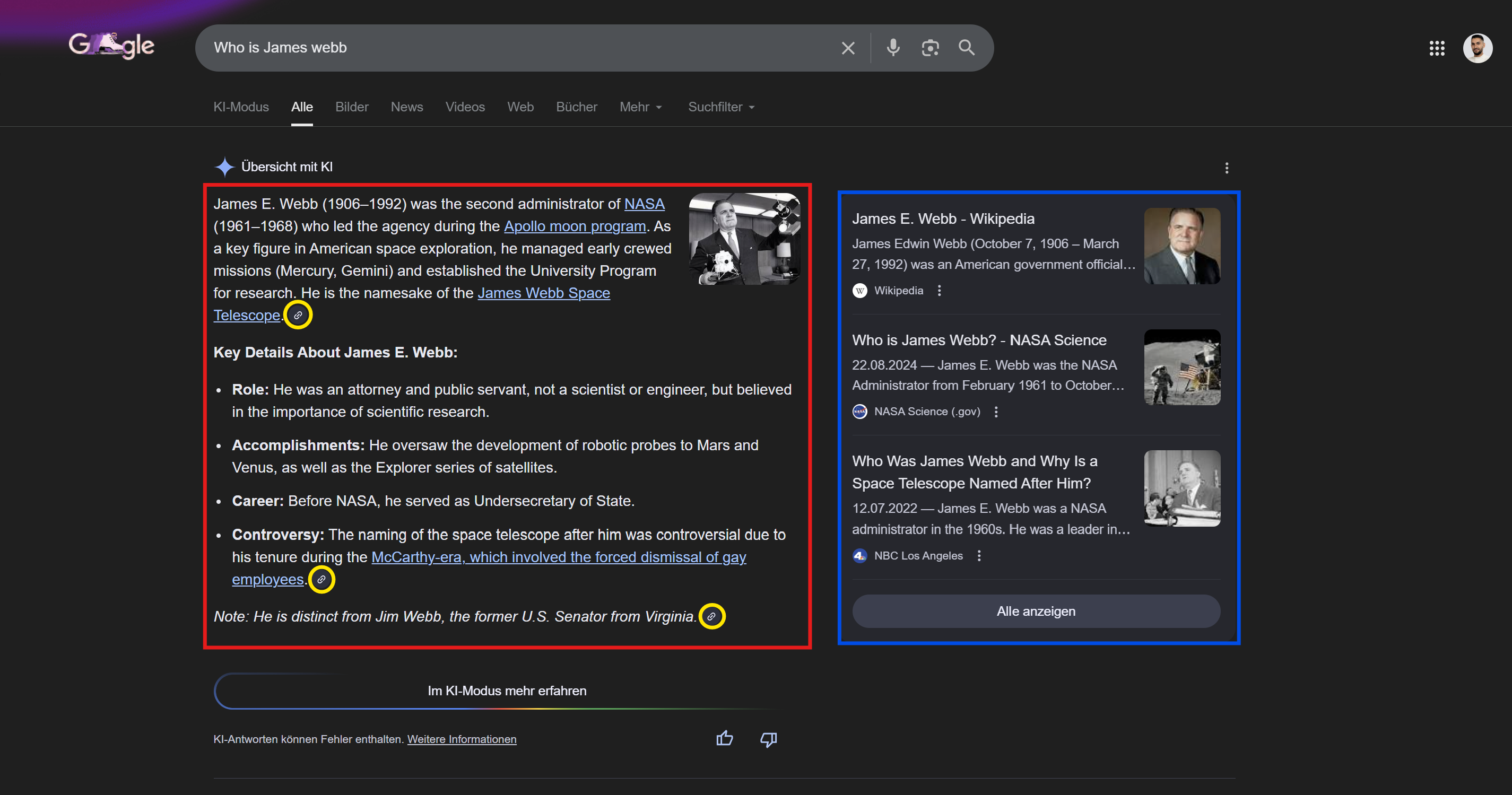
The highlighted boxes in the image indicate the different response components returned by the API.
| UI Element | API Field | Description |
|---|---|---|
| 🔴 Main AI Overview (red bordered area) | text | The AI-generated overview text that appears at the top of search results. This contains the synthesized information from multiple sources. |
| 🟡 Inline Citations (yellow circles within text) | citations | References embedded within the AI Overview (linked numbers). Each citation includes url, title, source, and favicon. |
| 🔵 Source Panel (right sidebar) | sources | The list of source websites shown on the right side, including url, title, source domain, and icon. |
citations array provides granular source attribution for specific claims within the AI Overview, while sources offers a broader list of all referenced websites with their metadata.
Example
The following example shows anAiOverviewEntity request and response:
| Key | Description |
|---|---|
text | The main AI-generated overview text displayed at the top of Google search results. This is the synthesized answer based on multiple sources. |
citations | An array of inline citations embedded within the AI Overview text. |
paragraphs | An array of paragraphs that compose the AI Overview, each containing its own text and associated citations. |
relatedLinks | A list of related source links displayed in the right sidebar of the Google AI Overview, including title, description, source domain, and favicon. |
screenshots | URLs to debugging screenshots captured during the AI Overview process by Tedi Browser, showing the initial state, the state before submission, and the final rendered response. |
ChatGPT Search
TheChatgptSearchEntity provides fields for ChatGPT-powered search results.
Definition
ChatgptSearchEntity
ChatgptSearchEntity fields:
| Property | Default | Description |
|---|---|---|
query | - | The search query string. |
webSearch | true | Whether to perform a web search (enables the ChatGPT search toggle) to retrieve real-time information. |
screenshots | true | Whether to include screenshots from Tedi Browser in the search results. |
countryCode | at | The ISO 3166-1 alpha-2 country code for the search location. |
languageCode | de | The ISO 639-1 language code for the search results. |
fields | - | Object to specify which response fields to include (citations, paragraphs). |
Screenshot URLs are only available for 24 hours after generation. Make sure to download or cache them if you need to retain them longer.
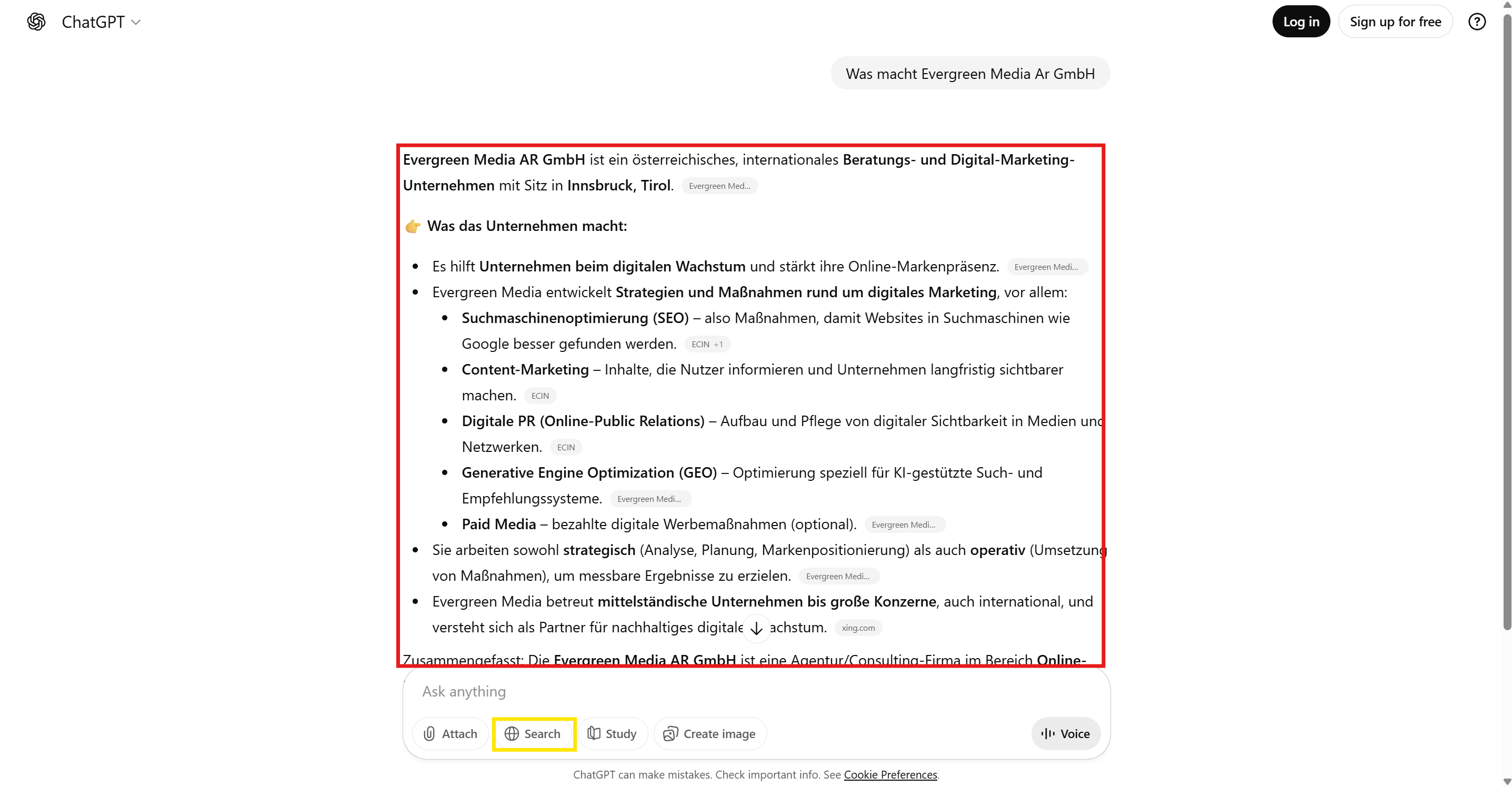
- 🔴 Main ChatGPT Response (red bordered area): The AI-generated answer text displayed in the main content area, synthesized from real-time web search results.
- 🔘 Inline Citations (gray boxes within text): References embedded within the ChatGPT response, linking to source URLs with specific text.
- 🟡 Web Search Toggle (yellow): When
webSearchis enabled, ChatGPT performs a real-time search to retrieve up-to-date information.
Example
The following example shows aChatgptSearchEntity request and response:
| Key | Description |
|---|---|
text | The main ChatGPT-generated response text displayed in the ChatGPT interface. This is the synthesized answer based on real-time web search results. |
citations | An array of inline citations embedded within the ChatGPT response text (e.g., “AdProfit +1”, “Aufgesang +1”). Each citation links to a source URL with the specific referenced text. |
paragraphs | An array of paragraphs that compose the ChatGPT response, each containing its own text and associated citations. |
screenshots | URLs to debugging screenshots captured during the ChatGPT Search process by Tedi Browser, showing the initial state, the state before submission, and the final rendered response. |
Perplexity
ThePerplexityEntity provides fields for Perplexity-powered search results.
Definition
PerplexityEntity
PerplexityEntity fields:
| Property | Default | Description |
|---|---|---|
query | - | The search query string. |
screenshots | true | Whether to include screenshots from Tedi Browser in the search results. |
fields | - | Object to specify which response fields to include (citations, sources, paragraphs). |
Screenshot URLs are only available for 24 hours after generation. Make sure to download or cache them if you need to retain them longer.
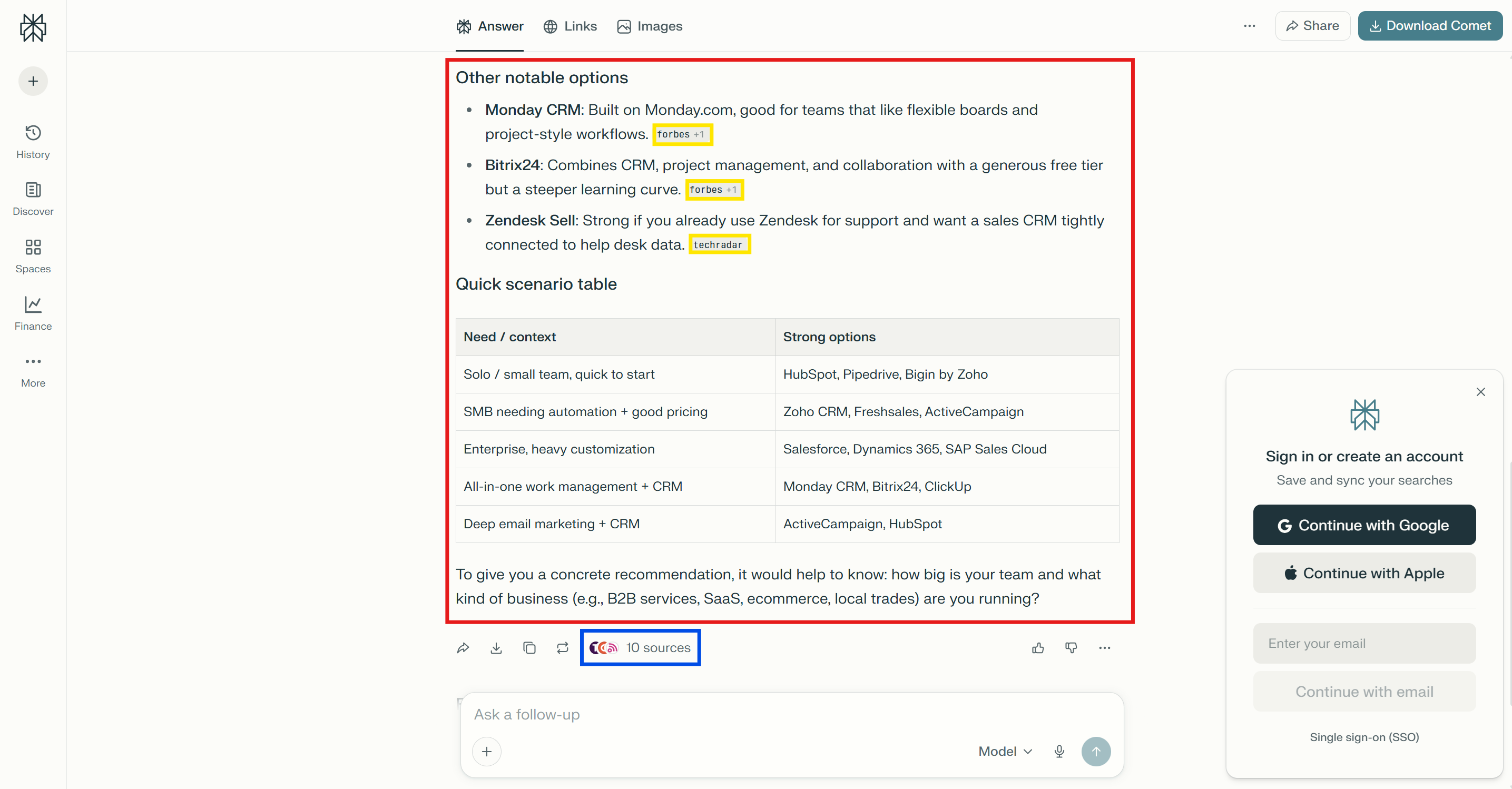
- 🔴 Main Perplexity Response (red bordered area): The AI-generated answer text displayed in the main content area, synthesized from real-time web search results.
- 🟡 Inline Citations (yellow boxes within text): References embedded within the Perplexity response (e.g., “forbes +1”, “techradar”), linking to source URLs.
- 🔵 Sources (bottom panel): The list of source websites used to generate the response.
Example
The following example shows aPerplexityEntity request and response:
| Key | Description |
|---|---|
text | The main Perplexity-generated response text displayed in the interface. This is the synthesized answer based on real-time web search results. |
citations | An array of inline citations embedded within the Perplexity response text. Can be empty if Perplexity does not include inline citations. |
paragraphs | An array of paragraphs that compose the Perplexity response, each containing its own text and associated citations. |
sources | An array of source websites used to generate the response, including URL, title, description, domain, and favicon. |
screenshots | URLs to debugging screenshots captured during the Perplexity process by Tedi Browser, showing the initial state, the state before submission, and the final rendered response. |
Gemini Search
TheGeminiSearchEntity provides fields for Google Gemini-powered search results.
Definition
GeminiSearchEntity
GeminiSearchEntity fields:
| Property | Default | Description |
|---|---|---|
query | - | The search query string. |
screenshots | true | Whether to include screenshots from Tedi Browser in the search results. |
countryCode | us | The ISO 3166-1 alpha-2 country code for the search location. |
languageCode | en | The ISO 639-1 language code for the search results. |
fields | - | Object to specify which response fields to include (citations, paragraphs). |
Screenshot URLs are only available for 24 hours after generation. Make sure to download or cache them if you need to retain them longer.
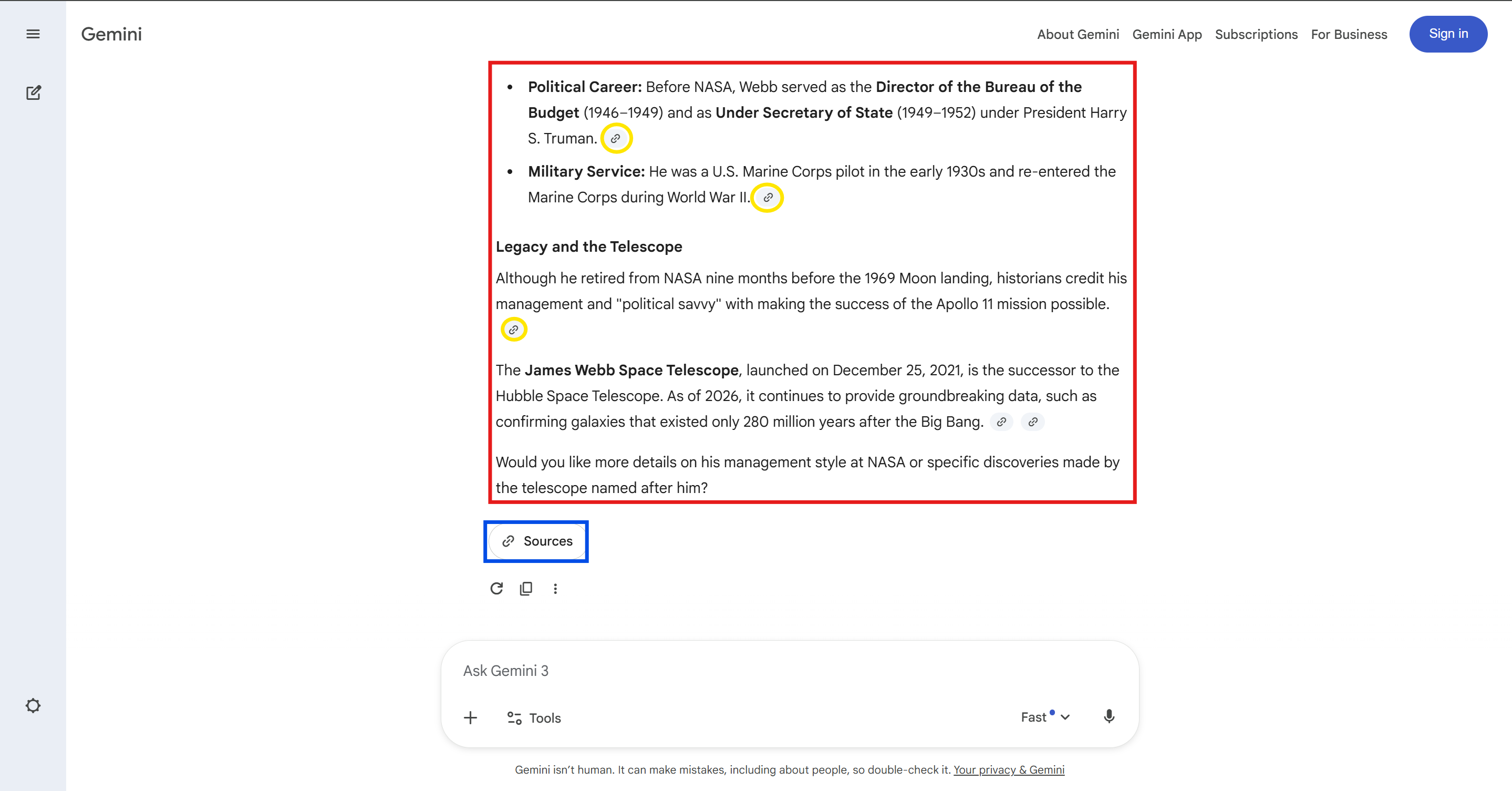
- 🔴 Main Gemini Response (red bordered area): The AI-generated answer text displayed in the main content area, synthesized by Google Gemini.
- 🟡 Inline Citations (yellow circles within text): References embedded within the Gemini response, linking to source URLs.
- 🔵 Sources Button (bottom panel): The expandable sources list with all referenced websites.
Example
The following example shows aGeminiSearchEntity request and response:
| Key | Description |
|---|---|
model | The model name used to generate the response (e.g., “Gemini”). |
text | The main Gemini-generated response text displayed in the interface. This is the AI-synthesized answer. |
citations | An array of citations used in the Gemini response, including URL, title, source, favicon, and description. |
paragraphs | An array of paragraphs that compose the Gemini response, each containing its own text and associated citations. |
screenshots | URLs to debugging screenshots captured during the Gemini Search process by Tedi Browser, showing the initial state, the state before submission, and the final rendered response. |
Conclusion
TheSearchEntity module represents a significant advancement in automated search capabilities, allowing users to access a vast array of public data points quickly and efficiently. With its ability to bypass anti-bot protections and deliver structured data across various search types, it sets a new standard for real-time information retrieval. As we continue to expand its capabilities to include social media and e-commerce platforms, the potential applications for businesses and developers are immense. Stay tuned for more updates as we push the boundaries of what’s possible with Tedi and our SearchEntity module!