


Documentation Index
Fetch the complete documentation index at: https://docs.evergreens.ai/llms.txt
Use this file to discover all available pages before exploring further.

Crawlability works instantly, no account connection, no waiting. Just select a domain and see results in seconds.
What is Crawlability?
Every time an AI model like ChatGPT, Claude, or Gemini learns from the web or answers a question using live content, it relies on bots, automated programs that visit websites and read their content. Your website tells these bots what they’re allowed to read using a file calledrobots.txt.
Crawlability shows you whether the world’s major AI bots can actually access your website - and flags anything that might be silently blocking your content from AI systems.
Think of it as a visibility audit for the AI era. If a bot can’t read your site, your content can’t appear in AI answers.
Getting Started
Select a domain
Choose one of your tracked domains from the project selector at the top of the page. Ai Brand Monitor instantly reads that domain’s
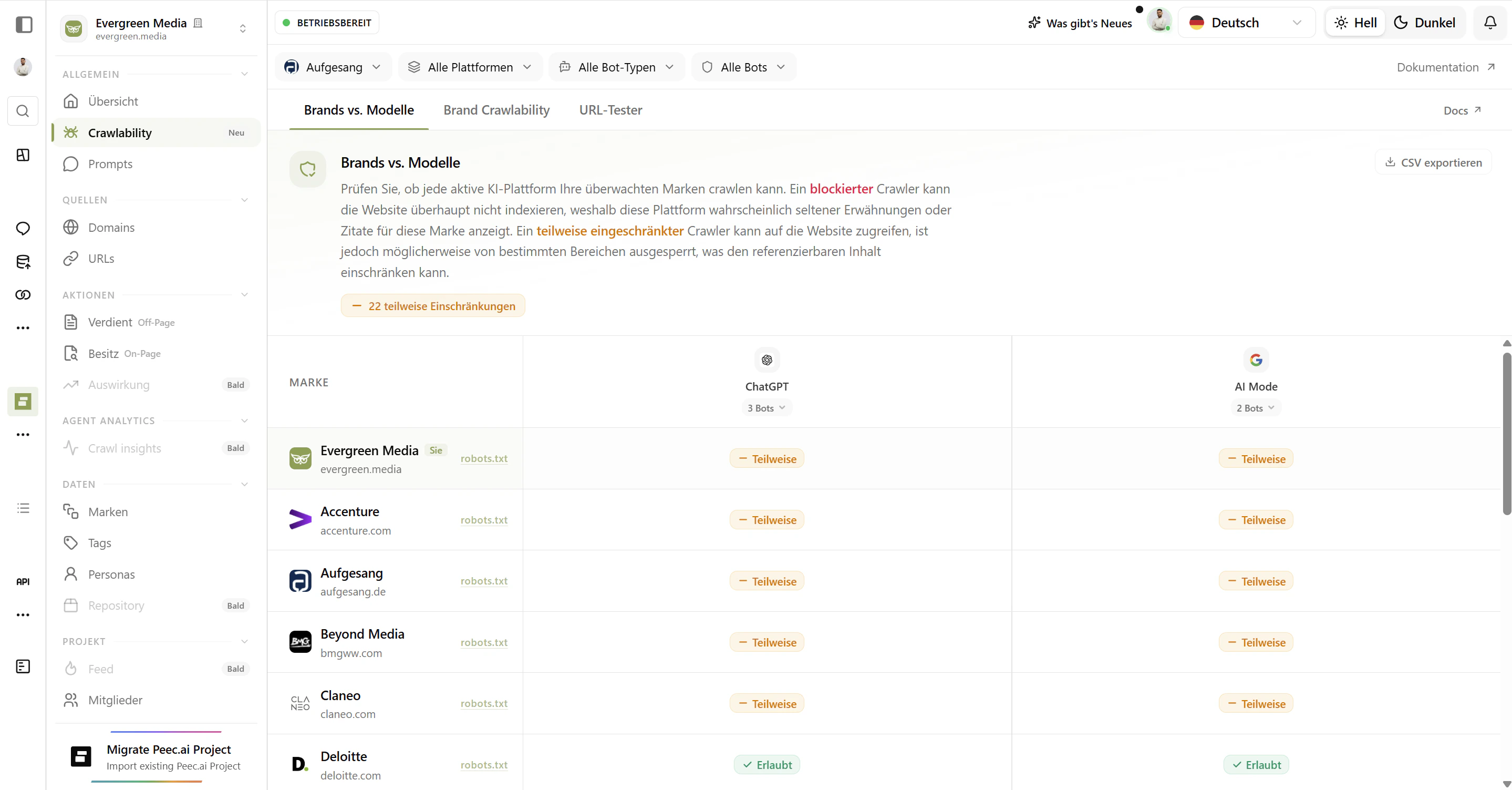
robots.txt file and checks it against 48+ AI bots from 20+ vendors.Read the table
The Crawlability table shows every bot, its status, and why it has that status. Green means go. Red means blocked. Yellow means partially restricted.
The Crawlability Table
The table is your control center. Each row represents one AI bot and tells you everything you need to know at a glance.
Bot
The technical identifier the bot uses to identify itself when it visits your site. For example:
GPTBot, ClaudeBot, Googlebot.Bot Type
What the bot is actually doing. Is it collecting training data, powering search, or responding to a live user question?
Platform
The company behind the bot - OpenAI, Anthropic, Google, Meta, and so on - along with the specific AI product it feeds into.
Status
Whether the bot is Allowed, Blocked, or Partially restricted by your current
robots.txt settings.Understanding Bot Status
Allowed - the bot can access your content
Allowed - the bot can access your content
Your
robots.txt permits this bot to crawl your website freely. The bot can read your pages and use that content in its AI systems - whether for training or for live answers.What this means for you: Your content is eligible to appear in responses from this AI platform. If you want visibility in ChatGPT, Claude, or Perplexity answers, you need the relevant bots to be Allowed.Partial - the bot can access some content
Partial - the bot can access some content
Your
robots.txt has a general rule (using a wildcard *) that restricts paths on your site, but there’s no specific rule for this individual bot. The bot inherits those general restrictions.What this means for you: Some of your content may be visible to this AI, and some may not. Check the Reason column to understand exactly what rule is applying.Blocked - the bot is explicitly denied
Blocked - the bot is explicitly denied
Your
robots.txt has a specific rule that explicitly disallows this bot. It cannot crawl your site at all.What this means for you: This AI platform cannot use your content as a source. If this is intentional, great. If not, this is the first thing to investigate.The Reason Column
The Reason column explains how a bot’s status was determined:- Explicitly mentioned: your
robots.txthas a rule written specifically for this bot’s user-agent identifier. - Following global rules: there’s no specific rule for this bot, so it’s following your site’s general
*(wildcard) rules.
Many sites accidentally block AI bots because of broad
Disallow: / rules originally written to block older search engine crawlers. The Reason column helps you spot this quickly.Filtering and Searching
When you’re managing 48+ bots, filters save time.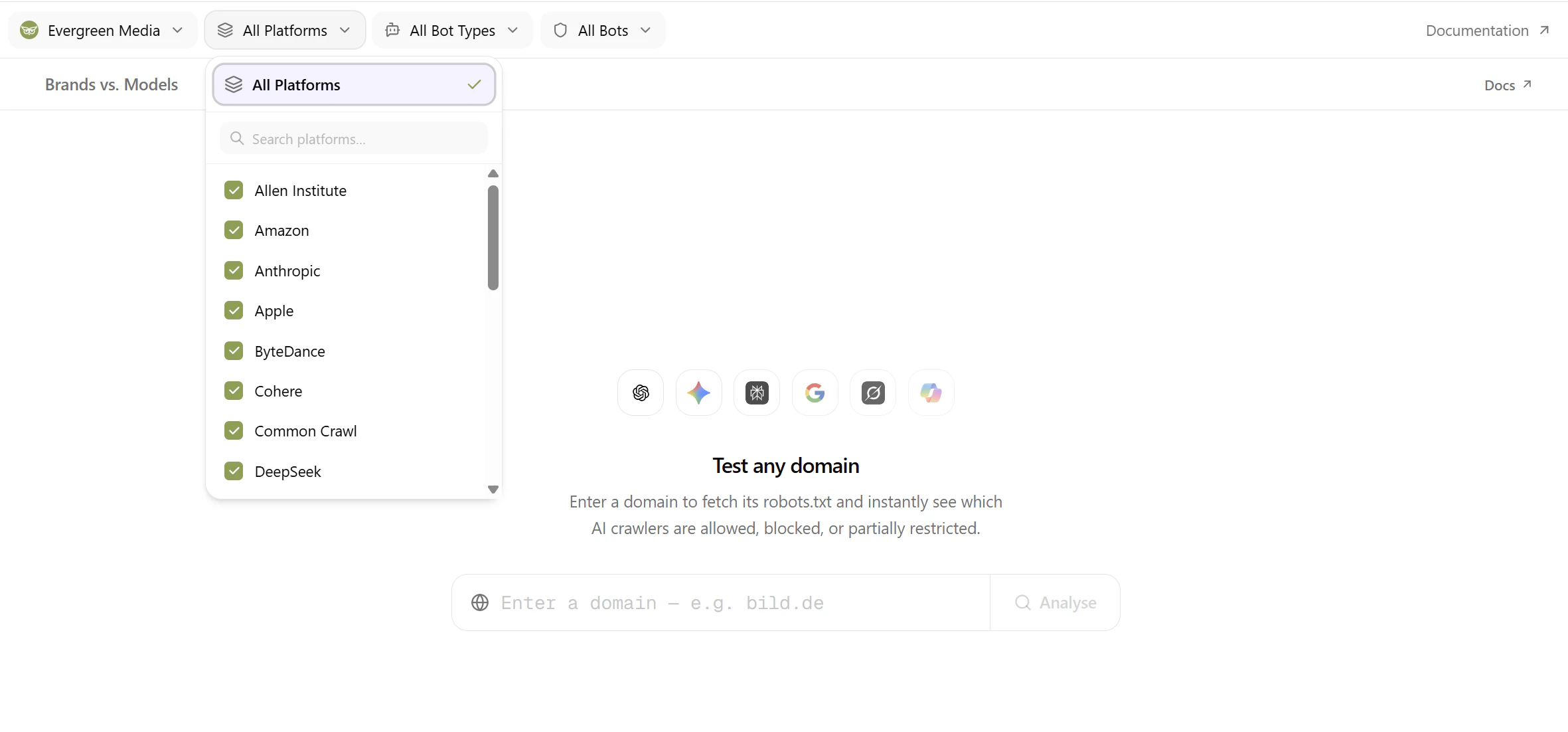
- Search
- Status Filter
- Bot Type
- Platform
- Individual Bots
Type any bot name or platform name into the search bar to instantly narrow the table. Useful when you’re looking for a specific bot like
GPTBot or a specific vendor like Anthropic.URL Tester
The URL Tester lets you analyze any domain on the web - not just your tracked projects. Enter a competitor’s domain, a partner’s site, or any URL you’re curious about.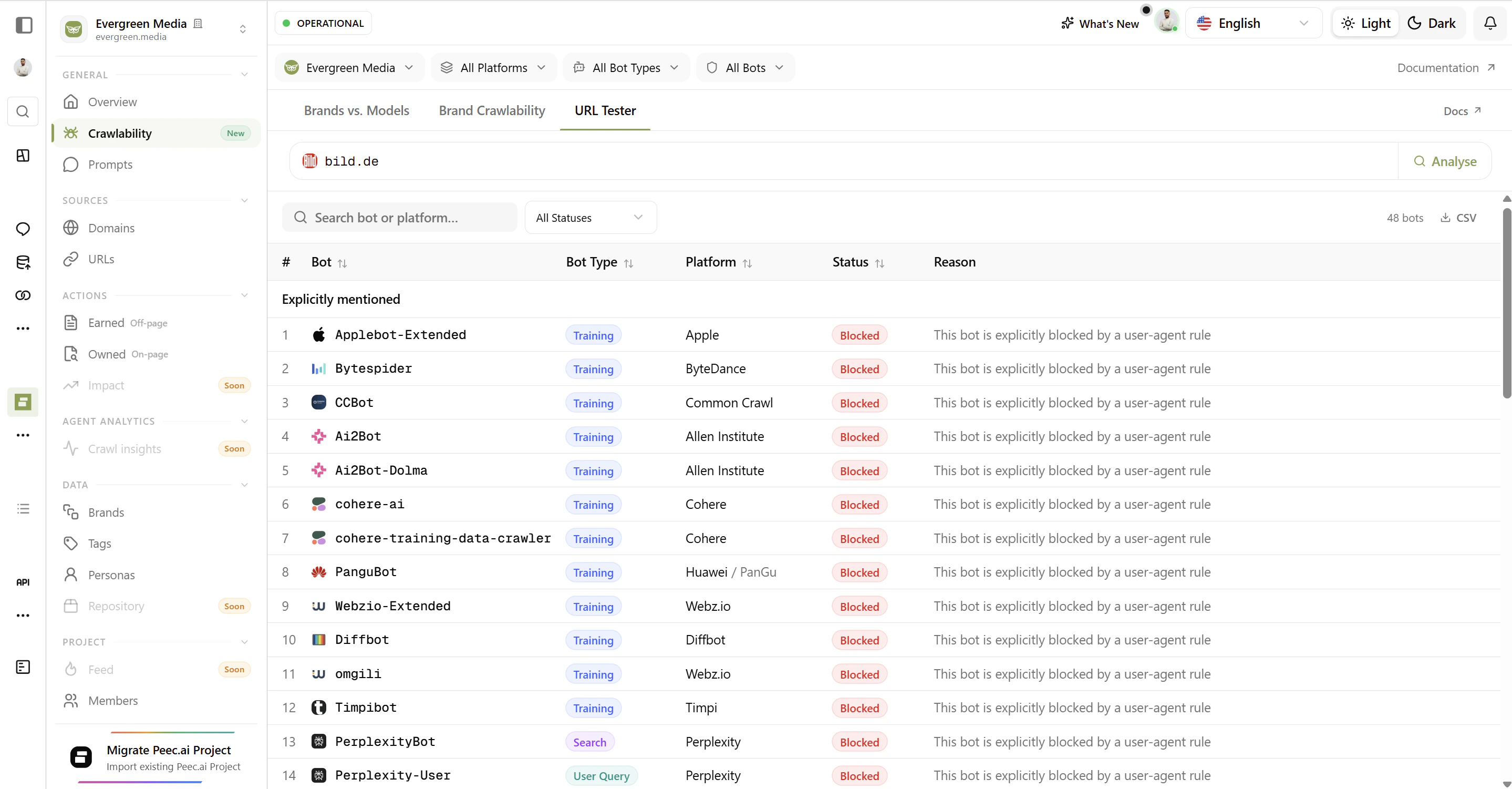
- Click the URL Tester tab at the top of the page.
- Type any domain (e.g.
apple.comoryoursite.com) into the search bar. - Click Analyse - results appear instantly.
- Explicitly Mentioned - bots that have a dedicated rule in that site’s
robots.txt. - Following Global Rules - bots that are subject to the site’s general wildcard restrictions.
Use the URL Tester to benchmark competitors. If a rival is blocking all AI training bots while you allow them, or vice versa, that’s a strategic difference worth knowing about.
Bot Types Explained
Not all AI bots have the same goal. Understanding the difference helps you make informed decisions about what to allow and what to block.Training Bots
These bots collect content to train AI models. If you block them, your content won’t be part of the dataset used to teach the model. Examples:
GPTBot, ClaudeBot, Google-Extended, anthropic-ai.Search Bots
These bots index your content for real-time retrieval - so when a user asks a question, the AI can pull in live information from your site. Examples:
OAI-SearchBot, PerplexityBot, Applebot.User Query Bots
These bots visit your site in real time when a user provides a specific link during a conversation. Think of it as the AI “clicking” a link on your behalf. Examples:
ChatGPT-User, Claude-User, Perplexity-User.Other
Utility crawlers, specialized scrapers, and bots with purposes that don’t fit neatly into the above categories. Examples:
ClaudeBot, YouBot, omgilibot.How to Interpret Your Results
Many bots showing Partial - is that a problem?
Many bots showing Partial - is that a problem?
Partial usually means your site has broad
robots.txt rules (like Disallow: /api/ or Disallow: /admin/) that all bots inherit. This is normal and often intentional. What matters is whether the paths being restricted contain content you want AI to access.If the restricted paths are just backend routes or staging areas, you’re fine. If they include your blog, product pages, or main content, consider adding explicit Allow rules for the AI bots you care about.I didn't mean to block that bot - how do I fix it?
I didn't mean to block that bot - how do I fix it?
Review your
robots.txt file and look for broad Disallow rules under the User-agent: * section. You can add a specific User-agent block for the bot you want to allow, with an Allow: / rule. This overrides the wildcard restriction for that specific bot.Example:Should I block training bots?
Should I block training bots?
This is a business decision. Some companies block training bots to prevent their proprietary content from being used in AI model datasets without compensation or credit. Others allow them to maximize AI visibility and reach.There’s no universal right answer. Ai Brand Monitor shows you your current state - the decision is yours.
What's the robots.txt file?
What's the robots.txt file?
robots.txt is a plain-text file located at the root of your website (e.g. yoursite.com/robots.txt). It’s an industry-standard way for websites to tell web crawlers - both traditional search engines and AI bots - which parts of the site they may or may not access.Bots are expected to respect these instructions, though compliance varies. All major AI platforms claim to honor robots.txt directives.Reloading and Viewing Your robots.txt
Reload robots.txt
Click Reload robots.txt in the top-right corner to fetch the latest version of your site’s file. Useful after you’ve made changes and want to see them reflected immediately.
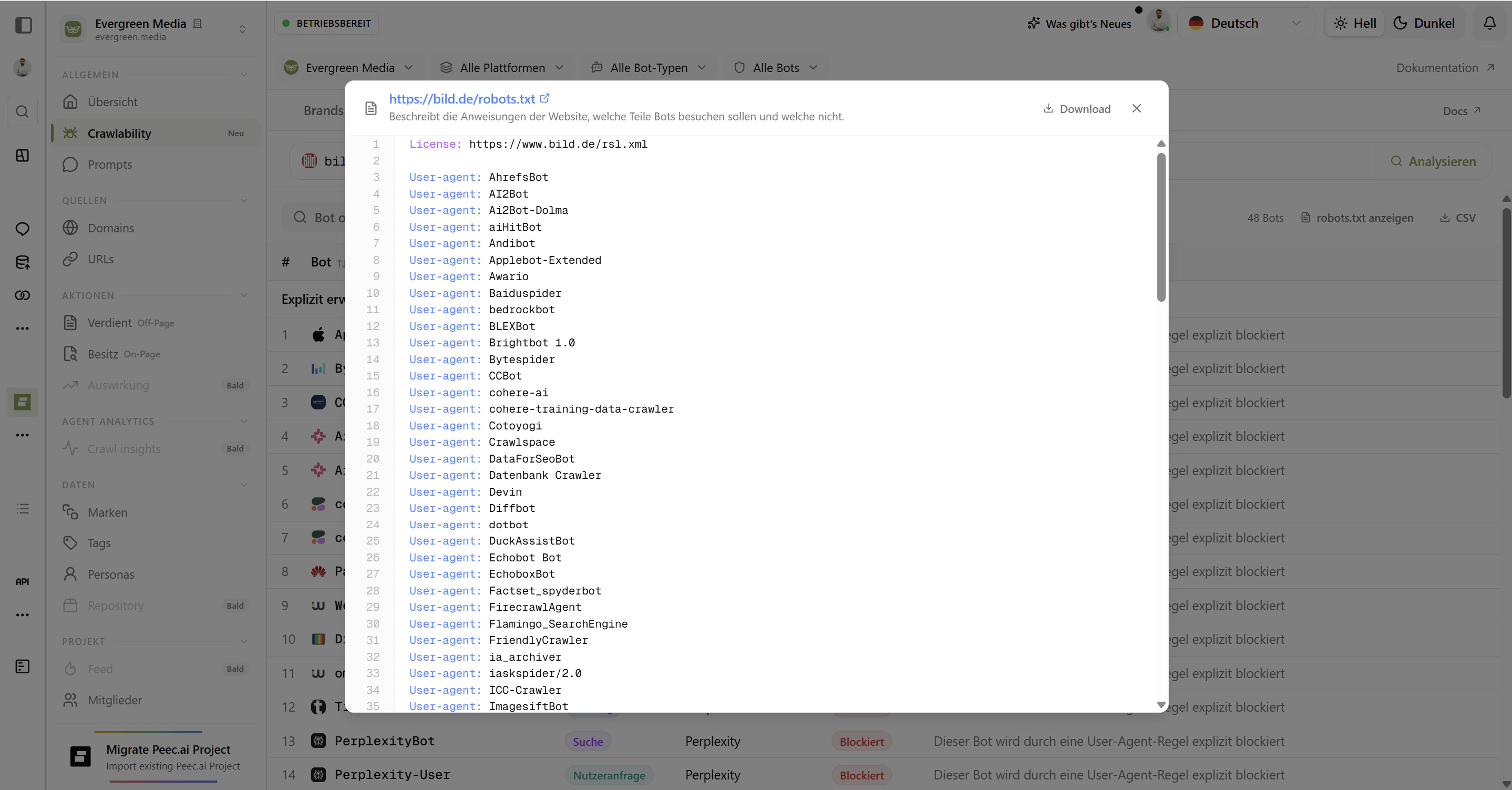
View robots.txt
Click View robots.txt to open your current file with full syntax highlighting. Quickly audit the exact rules in place without leaving Ai Brand Monitor.
Common Scenarios
| Scenario | What to look for | What to do |
|---|---|---|
| You want ChatGPT to cite your content | Check if OAI-SearchBot and ChatGPT-User are Allowed | If Blocked, add an explicit Allow rule for these bots |
| A competitor is invisible in AI answers | Run their domain in the URL Tester | Look for Blocked status on Search and User Query bots |
| You updated robots.txt but nothing changed | Click Reload robots.txt | Verify the new rules are being parsed correctly |
| You want to block AI from using your content for training | Look for Training bots with Allowed status | Add explicit Disallow rules for those bots |
| You’re seeing unexpected Partial results | Check the Reason column | Identify which wildcard rule is being inherited |
All Supported Bots
Ai Brand Monitor tracks 48+ bots across every major AI platform. The list is continuously updated as new AI systems are launched.Bots are categorized based on publicly available information and each vendor’s stated purpose. As real-world behavior becomes clearer, categories may be refined to ensure accuracy.
| Bot | Type | Platform | Purpose |
|---|---|---|---|
GPTBot | Training | OpenAI / ChatGPT | Primary crawler for OpenAI’s foundational model training. |
anthropic-ai | Training | Anthropic / Claude | General data collection for Claude model training. |
Google-Extended | Training | Google / Gemini | Opt-out token for Gemini training and AI product improvement. |
Meta-ExternalAgent | Training | Meta | High-velocity training crawler for Llama models. |
Applebot-Extended | Training | Apple | Used for training Apple’s generative AI features. |
Amazonbot | Training | Amazon | General training for Amazon Titan and Olympus models. |
Bytespider | Training | ByteDance | Training for TikTok and ByteDance AI products. |
CCBot | Training | Common Crawl | Massive open-source web archive used by many AI labs. |
Ai2Bot | Training | Allen Institute | General-purpose crawler for Allen Institute AI research. |
Ai2Bot-Dolma | Training | Allen Institute | Specifically builds the Dolma open dataset. |
cohere-ai | Training | Cohere | Training for enterprise-grade language models. |
cohere-training-data-crawler | Training | Cohere | Specialized crawler for raw Cohere training data. |
DeepSeekBot | Training | DeepSeek | Training for the DeepSeek model series. |
PanguBot | Training | Huawei / PanGu | Training for Huawei’s PanGu AI models. |
Webzio-Extended | Training | Webz.io | Large-scale data scraping for AI providers. |
Diffbot | Training | Diffbot | Structured data extraction as a service. |
FacebookBot | Training | Meta | Web crawler for Meta AI training data collection. |
omgili | Training | Webz.io | Forum and discussion crawler for structured dataset building. |
Timpibot | Training | Timpi | Decentralized search engine training crawler. |
GrokBot | Training | xAI / Grok | Real-time web search and training for Grok models. |
OAI-SearchBot | Search | OpenAI / ChatGPT | Real-time retriever powering ChatGPT search answers. |
Claude-SearchBot | Search | Anthropic / Claude | Anthropic’s bot for Claude’s search features. |
PerplexityBot | Search | Perplexity | Fact-checking and retrieval for Perplexity answers. |
Amzn-SearchBot | Search | Amazon | Search bot for Amazon’s AI shopping features. |
AzureAI-SearchBot | Search | Microsoft | Web retrieval for Azure AI and Copilot services. |
Google-CloudVertexBot | Search | Crawling for Google Cloud Vertex AI services. | |
meta-webindexer | Search | Meta | Search indexing for Meta’s AI assistants. |
Applebot | Search | Apple | Powers Spotlight, Siri, and Safari search functionality. |
Grok-DeepSearch | Search | xAI / Grok | Real-time web search for Grok’s deep research feature. |
xAI-Grok | Search | xAI / Grok | General-purpose web search bot for xAI and Grok. |
ChatGPT-User | User Query | OpenAI / ChatGPT | Visits links directly provided by a user in ChatGPT. |
Claude-User | User Query | Anthropic / Claude | Triggered when a Claude user prompts with a specific link. |
Perplexity-User | User Query | Perplexity | Used during a user’s Deep Research session. |
Manus-User | User Query | Meta | Action Agent: navigates and interacts with sites on user request. |
GoogleAgent-Mariner | User Query | Used by Google agents for web navigation (Project Mariner). | |
NovaAct | User Query | Amazon | Agent for automated web-based workflows on Amazon. |
Gemini-Deep-Research | User Query | Google / Gemini | High-intensity agent for user-requested Gemini research. |
MistralAI-User | User Query | Mistral | On-demand browser triggered by Mistral users. |
DuckAssistBot | User Query | DuckDuckGo | Summarizes pages for DuckDuckGo’s AI responses. |
quillbot.com | User Query | QuillBot | Fetches content to power QuillBot’s AI writing tools. |
meta-externalfetcher | User Query | Meta | Used for real-time link expansion on Meta platforms. |
Claude-Code | User Query | Anthropic / Claude | Fetches web resources during Claude Code sessions. |
ClaudeBot | Other | Anthropic / Claude | Official training bot for Anthropic models. |
Claude-Web | Other | Anthropic / Claude | Legacy bot for web browsing during Claude interactions. |
Google-Agent | Other | Used by Google agents to navigate the web and perform actions. | |
YouBot | Other | You.com | Fetches pages to power You.com’s AI search results. |
omgilibot | Other | Webz.io | Forum-specific crawler variant. Commercial data product. |
MyCentralAIScraperBot | Other | Unknown | Centralized AI data collection tool. |